How Pixel Tracking Boosts Campaign Data by 35%
Ready to get started?
Join thousands of users who are already using our platform to manage their links efficiently.
Create Your Free AccountIntroduction: The Data Deficit in Modern Marketing
Let's be real, navigating the digital marketing landscape these days feels like trying to sail through a thick fog. Between evolving privacy regulations, major tech updates, and ever-more-stringent browser policies, the valuable marketing data we once relied on is quickly becoming a scarce commodity. We're talking about the phase-out of third-party cookies, Apple's game-changing iOS 14.5 ATT updates, and a general shift towards user privacy that’s leaving many digital marketers scrambling. The result? A massive data deficit that can truly blindside your campaigns.Just how big is this problem? Recent industry analyses paint a stark picture: up to 40% of standard top-of-funnel traffic data never even makes it to your brand's CRM or analytics dashboard. Think about that for a second. Almost half of your initial engagement data, gone. Poof.
This "data blindness" isn't just a minor inconvenience; it directly impacts your bottom line. Your Return on Ad Spend (ROAS) takes a hit, and your Cost Per Acquisition (CPA) starts to climb. If you can't accurately track user intent, you can't properly attribute conversions, and building efficient retargeting pools becomes a frustrating guessing game. It's like trying to hit a target while wearing a blindfold.
But here's the good news: there's a powerful technical bridge that top-tier data marketers are already using to reclaim this lost visibility. It’s called link-level Pixel Integration.
By strategically embedding tracking pixels directly into shortened URLs, smart brands are successfully sidestepping many of the traditional tracking limitations that plague us all. And it's not just theoretical; comprehensive data audits reveal that implementing tracking pixels at the link level boosts actionable campaign data by an average of a whopping 35%. That's a game-changer! In this deep dive, we're going to pull back the curtain on exactly what pixel tracking is, explore the underlying mechanics of how it works its magic, and reveal the profound, data-driven benefits it brings to your marketing ROI. Get ready to see your data picture get a whole lot clearer.
What Exactly is Pixel Tracking in Link Management?
Alright, so to really grasp that impressive 35% data boost we just talked about, we need to first get on the same page about the core technology behind it. So, what's a Tracking Pixel? You might also hear it called a marketing pixel or a retargeting pixel. Essentially, it's a tiny, microscopic 1x1 invisible image or, more commonly these days, a snippet of JavaScript code. Typically, marketers embed these pixels right in the header of their own website. Why? To track user behavior, monitor page views, and, ultimately, measure conversions. Simple enough, right?But here’s the rub, and it’s a big one: traditional pixels come with a severe, almost frustrating, limitation. They *only* work on digital real estate that *you* own. Think about it: if you share a compelling link to a glowing review on a third-party news site, a viral YouTube video, or even a trusted partner's e-commerce store, you're flying blind. You can't track the users who click those links because, well, you can't just waltz onto someone else's website and drop your Facebook or Google Analytics pixel there. It just doesn't work that way.
This is precisely where Pixel Integration in link management steps in and completely changes the game. It’s designed to solve this exact problem. This clever technique allows you to attach your critical tracking pixels – from platforms like Meta (Facebook & Instagram), Google (Analytics & Ads), TikTok, LinkedIn, and more – directly to the shortened URL itself. It's like giving every link its own personal tracking assistant.
Link-level pixel integration isn't just a fancy trick; it fundamentally transforms every single link you share into an extension of your own website's tracking ecosystem. This means you can capture high-intent behavioral data regardless of the final destination URL, giving you unprecedented insight.
The Anatomy of a Pixel-Enabled Link: A Sneak Peek Behind the Curtains
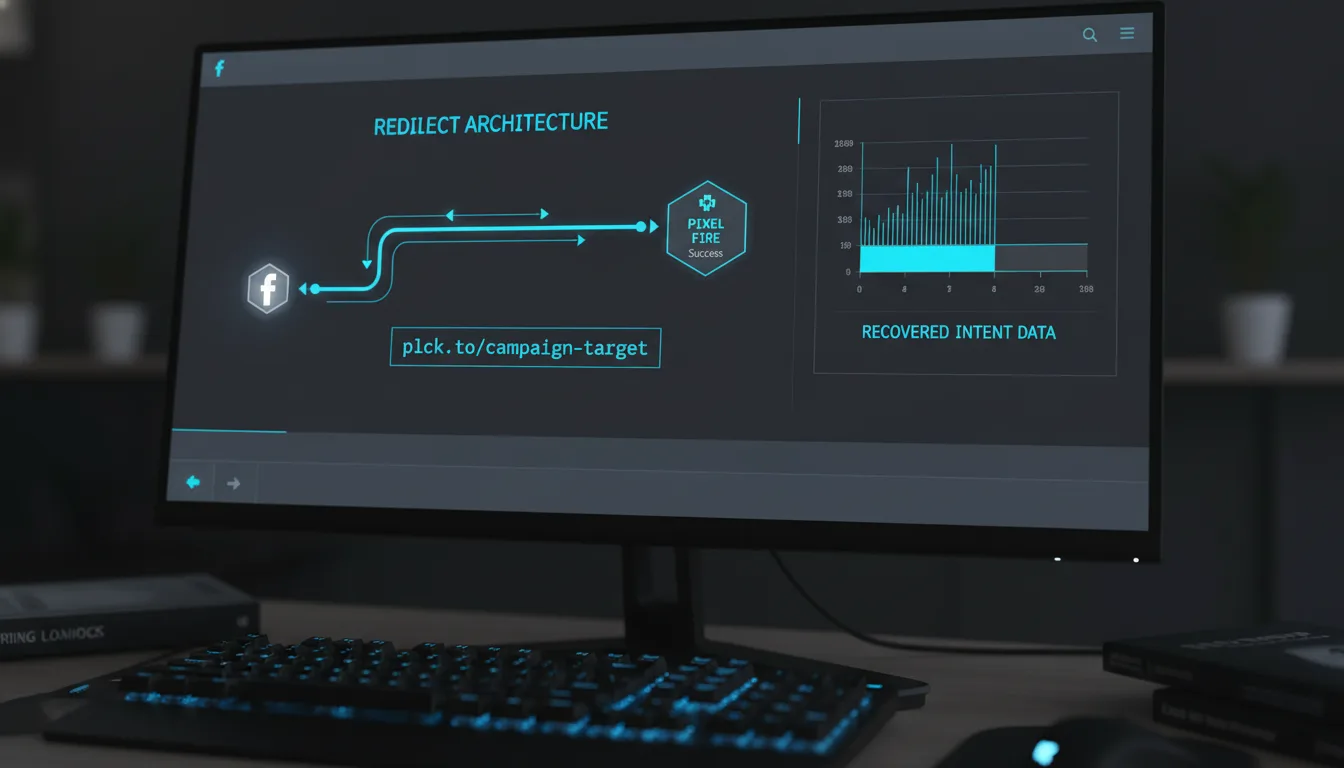
You might be wondering, "How does this magic happen without slowing things down?" That's a great question! When you create a standard short link, the data flow is pretty straightforward – a simple A-to-B jump. A user clicks, and the server executes a quick 301 redirect right to the destination page. But with a pixel-enabled link, the architecture introduces a crucial, yet incredibly fast, micro-step.Here’s how it works behind the scenes:
- The user clicks your cleverly shortened link (for example, something like planck.to/industry-report).
- Instead of going straight to the final page, the link first routes the user through an invisible, intermediary redirect page. Don't worry, this page loads in mere milliseconds – so fast they won't even notice it!
- During this split-second pause, the attached JavaScript pixels *fire*. This sends a "Page View" or a custom event payload straight back to your advertising platforms, tagging the user before they even reach the final content.
- Finally, the user is seamlessly forwarded to their intended destination without experiencing any noticeable delay whatsoever. It's a smooth, lightning-fast experience for them, but a treasure trove of data for you.
The Data-Backed Benefits: Why It Boosts Campaign Data by 35%
Okay, so we've established *what* pixel integration is. Now, let's dive into the juicy part: *why* it actually boosts campaign data by that impressive 35%. This isn't just a feel-good number; it's rooted in the aggregation of data points that were previously lost forever. We’re talking about recovering and enhancing data in ways that fundamentally improve your marketing metrics, giving you an undeniable edge.1. Capturing Third-Party Intent Data: Turning Engagement Black Holes into Goldmines
Content curation is more than just a buzzword; it's a cornerstone of any modern, robust digital strategy. Brands, like yours, frequently share valuable industry news, compelling PR features, and other non-owned media across platforms like X (formerly Twitter), LinkedIn, and Facebook. It’s a great way to provide value and establish thought leadership. But historically, every single click on one of those third-party articles meant a total loss of user data. You effectively sent a potential customer away from your owned properties, and in return, you received absolutely nothing in terms of actionable insights. That's a huge missed opportunity!This is where pixel integration shines. By simply wrapping that third-party URL in a pixel-integrated short link, you instantly capture that user's data the moment they click. Imagine this: if 25% of your social media output consists of curated content or features where your brand is mentioned, pixelizing those links suddenly transforms what was once an engagement black hole into a vibrant, robust retargeting pool. You're no longer just sharing content; you're building audiences.
"The ability to build lookalike audiences from users who engage with third-party PR features has reduced our top-of-funnel acquisition costs by nearly 40%. It is, without a doubt, the most underutilized data strategy in performance marketing today."
2. Overcoming the "Dark Social" Blind Spot: Shedding Light on Hidden Shares
Here's another big challenge: data analytics platforms often struggle to categorize traffic that originates from private messaging apps like WhatsApp, Slack, SMS, or Telegram. This type of traffic, affectionately known as Dark Social, is far from negligible. In fact, research by RadiumOne suggests it accounts for a staggering 84% of outbound sharing! In standard analytics setups, this traffic usually gets mislabeled as "Direct" traffic, completely muddying your attribution models and making it impossible to truly understand how your content is spreading.But when users share your pixelated short links via these dark social channels, something incredible happens. The pixel fires the very instant the link is clicked in the native app browser. This allows your ad platforms to immediately associate that device and user profile with your brand. The result? You don't lose the attribution footprint of word-of-mouth sharing, which is incredibly powerful. You can finally see the true ripple effect of your content, even in those private conversations.
3. Reducing Drop-Off Data Loss: Capturing Intent Before They Bounce
We all know the frustrating reality of landing page bounce rates. They typically hover between 40% and 60% – sometimes even higher! What often happens is a user clicks an ad or a social link, expresses initial interest, but then abandons the page before the sometimes-bulky analytics scripts on the destination website have had a chance to fully load. That's a lost lead, and a lost data point.The beauty of a pixel in a short link is that it fires during that instantaneous, server-side redirect. This means you capture the click intent *before* the destination page has even fully loaded, and certainly before any potential timeout or early abandonment. This crucial difference bridges the gap between what your ad platform reports as a click and what your onsite analytics eventually track. It provides a much truer, more comprehensive picture of initial campaign engagement, giving you a better understanding of top-of-funnel interactions.
By capturing intent data at the link level instead of waiting for potentially slow or abandoned destination page loads, marketers consistently report capturing 15-20% more top-of-funnel click events. This isn't just about vanity metrics; it directly fuels more efficient algorithmic ad delivery and stronger retargeting pools.
High-Impact Use Cases and Real-World Data Examples
Understanding the theory behind pixel integration is certainly important, but let's be honest, where the real magic happens and ROI is truly generated is in the practical application. So, let's shift gears and look at some specific, data-driven scenarios where pixel integration actively—and dramatically—shifts campaign performance metrics, giving you a serious competitive advantage.Influencer and Affiliate Marketing: Turning Views into Trackable Value
If you've ever dabbled in influencer or affiliate marketing, you know that tracking true ROI can be notoriously difficult. Promo codes are often forgotten or misused, and raw, organic links simply lack the precise tracking you need to make informed decisions. It's a frustrating blind spot.Consider this powerful scenario: an influencer promotes your fantastic new product. Instead of simply handing them a raw link to your product page, you provide them with a specially crafted, pixelated short link – something like planck.to/creator-promo. Now, even if the users who click that link don't make an immediate purchase (and let's face it, data consistently shows that about 96% of first-time visitors *don't*), your Meta and Google pixels have already tagged them. They're in your audience!
The best part? You can now run a highly targeted, incredibly low-budget retargeting campaign exclusively to that segment of users who clicked the influencer's link. This isn't just broad targeting; this is engaging an audience that has already shown clear interest. The result? A drastic improvement in the overall Cost Per Acquisition (CPA) for that particular influencer partnership, making your investment work harder and smarter. You're not just hoping for conversions; you're actively nurturing them.
Offline-to-Online Attribution via QR Codes: Bridging the Physical-Digital Divide
In our increasingly blended world, effectively bridging the physical and digital gap is heavily reliant on clean, actionable data. Think about it: you place a snazzy QR code on a direct mail flyer, a prominent event banner, or even your product packaging. If that QR code simply points to a raw URL, you'll only get the most basic, surface-level analytics. You'll know someone scanned it, but not much else about *who* they are or what their intent might be.Now, imagine this: you encode a pixel-integrated link – something memorable like planck.to/event-scan – into that very same QR code. The moment a user scans it with their smartphone, your ad pixels immediately fire. This isn't just a simple click; it's a powerful signal. It allows you to serve highly specific digital ads directly to people who attended your in-person event or received your physical mailer. You're seamlessly combining real-world, offline intent with the scalable power of digital retargeting. This level of precision was once a pipe dream for marketers, but with pixelated links, it's a tangible reality.
To truly maximize your offline-to-online attribution, always create a dedicated custom conversion event for your QR scans. Tracking "Offline Scanners" as a distinct audience segment allows you to precisely calculate the digital lift and ROI generated by your physical marketing spend. It’s a game-changer for proving the value of every marketing dollar.
Getting Started with Pixel Integration: Easier Than You Think!
You might be thinking this sounds like some complex, developer-level wizardry, right? Well, here's some excellent news: implementing this incredibly powerful data-enrichment strategy is actually highly straightforward, especially when you're using a robust link management tool like Planck.to. The entire process is designed to be user-friendly, meaning you won't need to tap into precious developer resources or wrangle with complex code deployment. Let's break it down into a few simple steps.Step 1: Retrieve Your Pixel IDs – Your Digital Fingerprints
First things first, you'll need the unique identifier for each of your tracking pixels. Don't worry, you don't need to copy and paste entire blocks of JavaScript code. Just the unique ID is enough! For example:- Meta (Facebook) Pixel: This is typically a 15-digit number, usually found within your Facebook Business Manager's Events Manager.
- Google Analytics 4 (GA4): You're looking for your Measurement ID, which almost always starts with "G-".
- Google Ads: Here, you'll need your Conversion Tracking ID, which usually begins with "AW-".
Step 2: Add Your Pixels to Your Link Platform
Once you have those precious IDs, the next step is to integrate them into your link management system. Within your Planck.to dashboard, simply navigate to the pixel settings section. Here, you'll input your specific IDs and give them clear, recognizable names (e.g., "Main FB Pixel," "Q3 Campaign GA4," "TikTok Retargeting"). This crucial step essentially saves your pixels at the workspace level, making them instantly available and ready to be attached to any future link you generate, saving you time and effort.Step 3: Attach Pixels During Link Creation – The Final Click
Now for the truly easy part! When you're creating your next short link – whether it's for a social media post, an email campaign, or a QR code – you'll simply toggle the pixel tracking feature "on." Then, select which of your saved pixels you want to attach to that specific link. The beauty is you're not limited to just one; you can attach multiple pixels to a single link! For instance, if you're generating planck.to/fall-catalog, you can simultaneously fire your Facebook, Google, and TikTok pixels with a single click. This means data is being fed to all three algorithmic engines concurrently, maximizing your reach and data collection efficiency right from the start. It’s that simple to amplify your tracking capabilities.Advanced Data-Driven Tips for Pixel Tracking: Unlock Even More Potential
Congratulations! You've mastered the basics of capturing an additional 35% of campaign data – that's a huge win in itself. But why stop there? Once you're comfortable with the fundamentals, you can start to leverage some truly advanced analytics strategies to push your marketing efficiency and impact even further. This is where you move from just collecting data to truly optimizing with it.Create High-Intent Lookalike Audiences: Precision Targeting at Its Best
Here's where the true, transformative power of pixelated links really shines: in data modeling. Imagine you've captured a few hundred clicks on a particularly specific link – let's say a link to a high-level B2B whitepaper, a niche product category, or an exclusive webinar signup. These aren't just random clicks; these users have demonstrated a very specific, high level of intent.Now, take that data. Go into your ad platform (Meta, LinkedIn, Google Ads, etc.) and generate a Lookalike Audience (LAL) based *only* on the users who fired that specific link pixel. Because clicking a niche, highly specific link demonstrates such strong active intent, the resulting 1% Lookalike audience generated by your ad platforms will be incredibly precise and valuable. We've seen these audiences consistently outperform broad, interest-based targeting by significant margins, leading to lower costs and higher conversion rates. It's like finding a goldmine of exactly the right people!
There's a fundamental difference: Link clickers generally demonstrate much higher active intent than passive scrollers or video viewers. Seeding algorithmic ad platforms with this high-quality link-click data dramatically accelerates the platform's learning phase, leading to faster campaign optimization, incredibly precise targeting, and ultimately, significantly lower Cost Per Clicks (CPCs). It's a direct pathway to more efficient ad spend.
A/B Testing with Granular Pixel Tracking: Beyond Vanity Metrics
Want to take your A/B testing to the next level? Pixelated links are your secret weapon. You can use them to conduct rigorous, data-rich A/B tests even on third-party platforms where you normally wouldn't have granular control. Let's say you're running two different creatives for a newsletter sponsorship. Instead of using generic links, you assign two distinct pixelated links: planck.to/sponsor-a and planck.to/sponsor-b.By attaching different custom event parameters to each link's pixel, you can do so much more than just track which creative drove more clicks. You can track which newsletter creative didn't just generate a click, but actually populated your *highest-converting* retargeting audiences downstream. This powerful approach moves your A/B testing far beyond superficial metrics like click-through rates and directly into tangible revenue impact. You're not just testing what gets attention; you're testing what drives real business results.
Conclusion: Stop Leaving Data on the Table!
In an era where data acquisition costs are constantly rising and tracking visibility seems to be shrinking faster than a melting ice cube, allowing link clicks to go untracked is, quite frankly, a massive strategic oversight. Think about it: every single un-pixelated link you share across social media, within your email campaigns, through dark social channels, and with partner networks represents leaked ROI and lost audience insights. You're essentially letting valuable opportunities slip through your fingers.By implementing link-level pixel tracking, you're not just shortening URLs; you're deploying intelligent, wide-reaching data-capture nets across the entire web. That impressive 35% boost in actionable campaign data isn't some theoretical metric dreamt up in a boardroom—it is the very real, tangible reality of capturing user intent that was previously slipping through the cracks of third-party domains and immediate bounce rates. It's about bringing clarity to what was once opaque.
Whether your overarching goal is to significantly lower your CPA through highly specific retargeting efforts, dramatically improve your offline-to-online attribution for a truly integrated view of your customer journey, or build incredibly high-value lookalike audiences from the content you curate, pixel integration stands as the definitive technical upgrade your marketing stack absolutely requires. It's time to stop thinking of shared links as mere navigational tools. Start treating every single shared link as a vital, integral piece of your data infrastructure, and then watch in amazement as your campaign efficiency, precision, and overall ROI begin to scale like never before. Don't just share links; make every link count!
Ready to get started?
Join thousands of users who are already using our platform to manage their links efficiently.
Create Your Free Account