Tame Your Links: The Space Management Story & Tutorial
Ready to get started?
Join thousands of users who are already using our platform to manage their links efficiently.
Create Your Free AccountTame Your Links: The Space Management Story & Tutorial
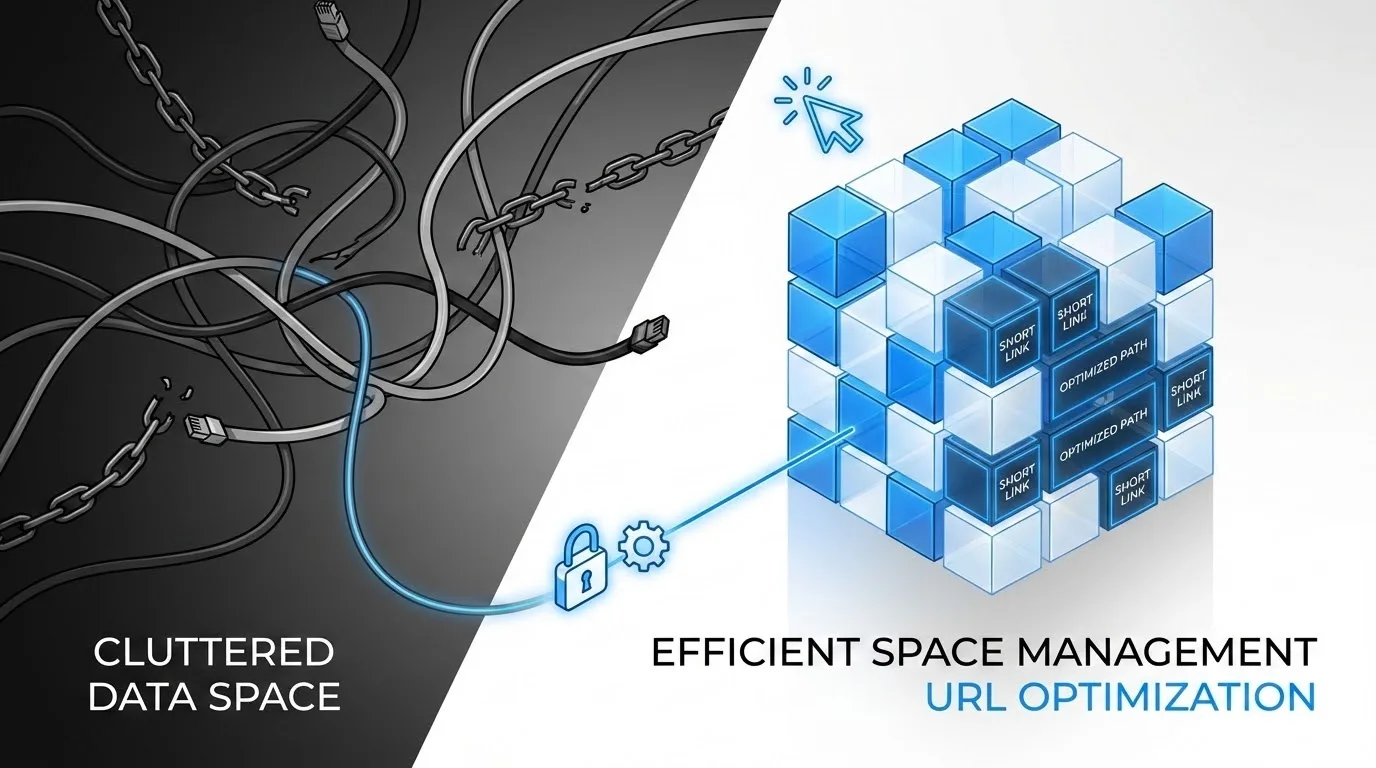
Once upon a time, in the bustling digital world, there lived a content creator named Alex. Alex absolutely adored sharing ideas, articles, and products, but let's be real, their digital life was a chaotic mess. Their browser bookmarks? Overflowing! Spreadsheets groaned under the weight of countless URLs, and honestly, finding that one specific link shared months ago felt exactly like searching for a tiny needle in a colossal haystack. Every new campaign, every client project, every personal endeavor just piled another layer onto the digital disarray.
Does Alex's story hit a little too close to home? If you've ever felt totally overwhelmed by the sheer volume of links you manage, trust me, you're definitely not alone. In today's hyper-connected world, links aren't just pathways; they're the absolute lifeblood of communication. They're how we share, track, and engage with our audience. But without a solid, proper system, these powerful tools can quickly spiral into a tangled web of confusion. That's where the genuine magic of Space Management steps in to save the day.
What is Space Management? Think of it as Your Digital Filing Cabinet!
Alright, let's picture your physical workspace for a second. Do you have one giant, overflowing desk where everything from crucial client contracts to forgotten coffee receipts somehow coexists in a single, haphazard pile? Or do you lean towards neatly organized drawers, clearly labeled folders, and tidy shelves, each meticulously dedicated to a specific project, client, or type of document?
Space Management for your links is precisely like building that wonderfully organized, efficient workspace, but in your digital realm. It's a powerful, often overlooked feature designed to inject order and crystal-clear clarity into your online life. How? By allowing you to create dedicated, isolated environments specifically for your shortened links. Imagine each "space" as a distinct digital folder, or even a separate, well-defined room in your virtual office, meticulously crafted to hold specific collections of links without any cross-contamination.
Here's the thing: it's not just about simple categorization; it's about deep-level compartmentalization. Each space acts as its own self-contained ecosystem for your links, complete with its own unique settings, isolated analytics, and granular permissions. This means you can effortlessly keep your marketing campaign links entirely separate from your internal team resources, or perfectly segregate links for different clients, ensuring absolutely no cross-contamination or frustrating confusion. It’s like having multiple, highly organized brains for your links, all working in harmony.
Space Management isn't merely about grouping links together; it's about creating entirely separate, highly manageable environments tailored for different projects, clients, or teams. This significantly enhances your overall organization and gives you ultimate control.
Why "Spaces" are So Much More Than Just "Tags" or "Folders"
You might be wondering, "Couldn't I just use tags or folders?" And yes, while tags and folders are certainly useful for basic categorization, spaces actually offer a much deeper level of segregation and control. A tag, for instance, might apply to links that span various projects, and a folder often just groups links visually. A space, however, creates a distinct, impenetrable boundary. It's a completely separate container that intelligently holds all related links, along with their specific settings, and even relevant team members, all united for a single, specific purpose. This holistic, all-encompassing approach makes it absolutely ideal for managing complex digital strategies and keeping everything in its right place.
How Space Management Works: Building Your Organized Digital World
Now, let's really dive into the nitty-gritty mechanics of how these incredible spaces actually function. At its very core, space management empowers you to:
- Create Dedicated Environments: You kick things off by defining a brand-new space. This could be something like "Spring Marketing Campaign 2024," "Client X Project," or even "Internal Team Resources." The beauty is, each space gets its own unique name and, crucially, its own distinct purpose.
- Assign Links: Once you've got a space created, any new shortened link you generate can be directly assigned to it. But wait, there's more! You can also easily move existing links into their appropriate spaces. So, if you create planck.to/springsale, it simply glides right into your "Spring Marketing Campaign 2024" space. Neat, right?
- Isolate Analytics: This, my friends, is a total game-changer. Within each space, you'll see only the analytics that are truly relevant to the links residing in that specific space. No more endlessly sifting through mountains of global data just to pinpoint campaign-specific performance. You get laser-focused, actionable insights that truly matter.
- Manage Team Access (if applicable): For dynamic teams, spaces evolve into powerful collaboration hubs. You can grant specific team members access *only* to the spaces they genuinely need to work on. This ensures top-notch data privacy and drastically reduces unnecessary clutter for everyone involved.
- Maintain Custom Branding: Each space can be cleverly configured with its very own custom domains. Imagine the possibilities! One space could be using planck.to/mybrand for all your marketing efforts, while another, entirely separate space uses planck.to/clientsolutions for your client-facing links. Talk about brand consistency!
Ultimately, this system empowers you to segment your link management efforts in a super logical way, perfectly mirroring how you might organize physical documents or digital folders on your computer. It truly lets you view and manage your links not as one single, never-ending list, but as distinct, purposeful, and easily digestible collections.
The Story of Benefits: How Spaces Transform Your Workflow
Remember Alex, our once-overwhelmed content creator? Well, they discovered Space Management, and let me tell you, their story took a dramatic turn for the better! Here’s how these incredible spaces can write a similar success story for *you* and your digital ventures:
Enhanced Organization and Clarity That You'll Love
Say goodbye to endless scrolling or frantic, last-minute searching. With spaces, every single link has a clear, designated home. Alex could, for instance, instantly navigate to their "New Product Launch" space and effortlessly find all related short links – everything from crucial landing pages (like planck.to/newproduct) to those engaging social media posts (planck.to/producttweet).
"Before spaces, my link dashboard was frankly, a digital junk drawer. Now, it's a meticulously organized library. I save so much time every single day; it's honestly incredible."
Streamlined Analytics and Reporting That Makes Sense
Imagine the scenario: you need to quickly report on the performance of your epic holiday marketing campaign. Without spaces, you'd be stuck manually filtering through all your links, desperately hoping you tagged everything correctly. But with spaces? You simply select the "Holiday Campaign" space, and instantly, all relevant analytics are beautifully displayed – clear, concise, and perfectly campaign-specific. Poof! No more headaches.
This kind of clarity is absolutely invaluable, especially when you're trying to demonstrate a solid ROI and make those crucial, data-driven decisions. If planck.to/holidaysale is performing exceptionally well in one specific space, you know exactly which campaign it belongs to, without a shadow of a doubt.
Improved Collaboration and Seamless Team Management
For bustling teams, spaces are nothing short of a godsend. Take Sarah, a busy marketing manager. She can effortlessly create a "Client A" space and grant access *only* to the team members actively working on that particular client. This ensures everyone has immediate access to the correct links (e.g., planck.to/clientA_portfolio), but more importantly, critical links for other clients remain private and safely out of sight. It dramatically reduces errors, sharpens focus, and seriously enhances data security – a win-win for everyone!
Consistent Branding Across All Your Projects
If your brand cleverly utilizes multiple custom domains for different initiatives (think one for corporate communications, another for special events), spaces allow you to assign a specific custom domain to each individual space. This maintains consistent branding so effortlessly, ensuring that all links within a "Corporate Communications" space use planck.to/mycorp, while an "Event Registration" space proudly uses planck.to/myevents. It's brand harmony, simplified.
Always use spaces to create a single source of truth for all links related to a specific project or client. This instantly reduces confusion and ensures every single person on your team is consistently using the correct, tracked URLs. No more "which link was it again?" moments!
Practical Examples: See Spaces in Action!
Want to see how spaces really shine in the real world? Let's take a look at a few common scenarios where they truly make a difference:
Marketing Agencies
A bustling marketing agency, managing a portfolio of diverse clients, can create a dedicated, impeccably organized space for *each* client. Imagine "Client Bluebird," "Client Greenleaf," and "Client Sunshine." Each space then naturally contains all the relevant short links (e.g., planck.to/bluebirdpromo, planck.to/greenleafreport) specifically for that client, allowing for effortless client-specific reporting and seamless team collaboration. It's agency life, made simpler.
Product Development Teams
For a dynamic software company, spaces can be a game-changer for different products or feature rollouts. Think "Product Alpha Launch" or "Product Beta Updates." This ingenious setup keeps links for release notes (planck.to/alpharelease), user feedback forms (planck.to/betafeedback), and all your marketing materials perfectly separate and beautifully organized. No more mixing up product versions!
Educators and Content Creators
Teachers, take note! You can create spaces for different courses or semesters: "Fall Semester Biology," "Spring Semester Literature." The result? All your lesson links (planck.to/biolecture1), essential reading materials (planck.to/litreading), and even assignment submissions (planck.to/assignupload) are neatly categorized and incredibly easy to access. Students (and teachers!) will thank you.
Personal Branding and Freelancers
Even for solo operators, spaces are undeniably invaluable. A smart freelancer might have "Portfolio Links," "Client Inquiries," and "Personal Blog Content" spaces. This simple separation helps to clearly distinguish professional work from personal projects, like links to their latest blog post (planck.to/myblogpost) or their crucial contact form (planck.to/contactme). It keeps your professional persona polished and precise.
Getting Started: Your Easy Step-by-Step Tutorial
Alright, feeling ready to finally tame your links and experience the undeniable power of true organization? Fantastic! Here’s a simple, straightforward, step-by-step tutorial on how to start leveraging Space Management today.
Step 1: Access Your Dashboard
- First things first, log in to your account.
- Once you're logged in, you'll land directly on your main dashboard, which typically gives you a quick overview of all your overall link activity.
Step 2: Navigate to Spaces
- Look for a navigation item clearly labeled "Spaces" or something similar, usually in the sidebar or top menu. Give it a click!
- This action will whisk you away to the Space Management interface. Here, you'll either see a list of any existing spaces you've already created, or you'll be presented with a clear option to create a brand-new one.
Step 3: Create a New Space
- Now for the fun part: Click on the "Create New Space" button. It’s often visually prominent, perhaps a "+ New Space" button, easy to spot!
- A modal window or a form will pop up, asking you to enter a name for your shiny new space. Be descriptive! Something like "Q3 Marketing Campaign" or "Client Acme Project" works wonderfully.
- (Optional, but worth noting!) Depending on your specific plan, you might also have the immediate option to assign a custom domain to this space or even add team members right away. For now, just a great name is usually all you need to get started.
- Finally, click that "Save" or "Create" button. And just like that, you've got a new space!
You've successfully created your very first digital space! How empowering is that? Now, let's get some links into it!
Step 4: Assigning Links to Your Space
You've got a couple of straightforward ways to assign links to your new, organized haven:
A. Creating a New Link within a Space:
- From your main "Links" view, simply click "Create New Link".
- Go ahead and enter your long, original URL, then customize your short link to be memorable (e.g., planck.to/newfeature).
- Crucially, keep an eye out for a dropdown or selection box clearly labeled "Space". This is where you'll select your newly created space (e.g., "Q3 Marketing Campaign") from the list.
- Complete any other settings you desire and then hit "Save". Done and done!
B. Moving Existing Links into a Space:
- Head over to your main "Links" view, the place where all your existing links are neatly listed.
- Carefully select the links you wish to move. You can often select multiple links at once using handy checkboxes.
- Now, look for an "Actions" or "Move To" button. Give it a click!
- From the presented options, choose "Move to Space" and then simply select your desired space from the dropdown menu.
- Confirm the action, and watch as your links find their new, organized home!
Make it a habit to regularly review your "Unassigned" links (if your platform makes them visible). This ensures that all your links eventually find a proper, organized home within a dedicated space, keeping chaos at bay!
Step 5: Managing Your Spaces (Edit/Delete)
- From the "Spaces" view, you'll see a comprehensive list of all your created spaces.
- Typically, each space will have an "Edit" (often represented by a pencil icon) and a "Delete" (a trash can icon) option right next to it.
- Click "Edit" if you want to change the space's name, assign or unassign custom domains, or modify team access permissions.
- Click "Delete" to remove a space entirely. But be incredibly careful here! Deleting a space usually prompts you to decide what to do with the links that live inside it (e.g., move them to another space, move them to the unassigned category, or delete the links permanently). Always double-check before confirming!
Advanced Tips for Space Management Mastery
Once you've got the basics down pat and feel confident, here are some pro tips to truly master space management and elevate your link organization game to the next level:
Strategic Naming Conventions Are Your Best Friend
Please, please don't just name your spaces randomly! Instead, adopt a consistent, logical naming convention from the get-go. For instance, consider these:
- [Client Name] - [Project Type] (e.g., "Acme Corp - Q4 Marketing")
- [Year] - [Campaign Name] (e.g., "2024 - Summer Promo")
- [Team/Department] - [Function] (e.g., "HR - Onboarding Docs")
Trust me, this seemingly small step makes it exponentially easier to find and understand your spaces at a mere glance, especially as your number of spaces inevitably grows. Your future self will absolutely thank you!
Leverage Team Permissions Like a Pro
If your plan generously allows for team members, make full and strategic use of those permission settings. Granting specific team members access *only* to the spaces that are truly relevant to their work not only reduces clutter for them but significantly improves security. It also ensures they're interacting exclusively with the links they genuinely need to manage (e.g., a junior marketer might only access the "Social Media Campaigns" space for links like planck.to/instapost). Smart, secure, and streamlined!
Integrate Custom Domains Thoughtfully and Strategically
If you're already rocking custom domains, don't just assign them willy-nilly. Instead, assign them strategically to your spaces. You might decide to use your primary brand domain for all general marketing efforts in one space, dedicate a specific campaign domain for a short-term, high-impact promotion in another, and reserve an internal domain exclusively for team resources in a third. This clever approach powerfully reinforces your brand identity and maintains crystal-clear campaign separation.
Regular Audits and Smart Archiving
Make it a habit to periodically review your spaces. Ask yourself: Are there old campaigns that are no longer active or relevant? Consider archiving them (if your platform supports such a feature) or perhaps merging their links into a general "Archived Links" space. This practice keeps your active workspace clean, focused, and free from digital cobwebs. And if a space is truly obsolete? Go ahead and delete it, but always ensure you've moved or deleted its links appropriately first. Cleanliness is next to digital godliness!
Conclusion: The End of Link Chaos is Here!
Alex's story is a pretty common one, isn't it? But here’s the really good news: thanks to powerful features like Space Management, that chaotic story doesn't have to be yours. From the very moment they embraced organized spaces, Alex's entire digital life underwent a remarkable transformation. No more frantic searches, no more confused analytics, just clear, concise, and incredibly efficient link management that brought a huge sense of calm and control.
Space Management isn't just another feature on a long list; it's a profound philosophy for achieving undeniable digital clarity. It empowers you, whether you're a bustling solo entrepreneur, a dynamic marketing agency, or a sprawling large enterprise, to build a structured, efficient, and ultimately scalable system for all your shortened links. So, what are you waiting for? Take absolute control of your digital world – create your very first space today and truly experience the undeniable, transformative power of organization!
Ready to get started?
Join thousands of users who are already using our platform to manage their links efficiently.
Create Your Free Account